Roqueman API Client
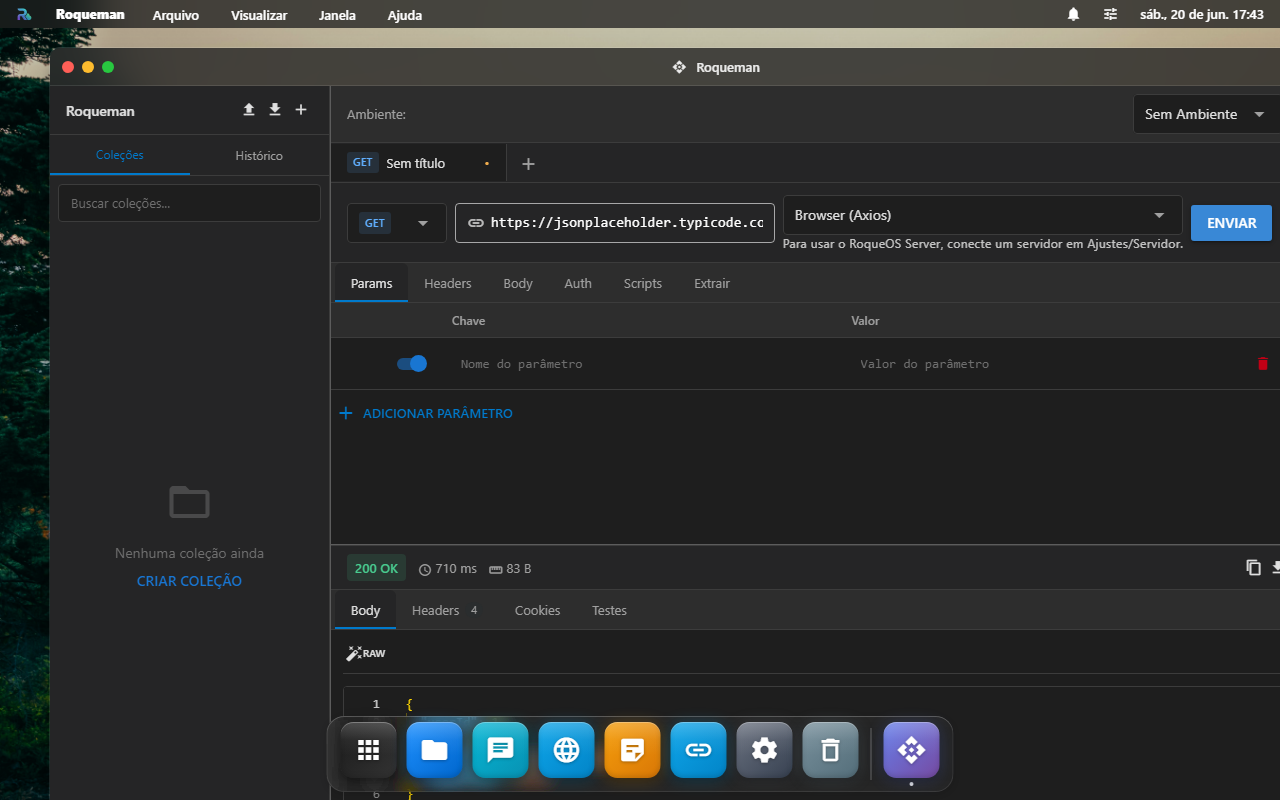
Roqueman is the RoqueOS API client, a Postman/Insomnia that runs inside your web desktop. Build and fire HTTP, WebSocket and GraphQL requests, organize everything in collections, use variables and environments, write test scripts, and automate flows with response chaining and the collection runner, with nothing to install.
Why this is useful
You test your APIs in the same place you already work, with data synced to your account. No separate app, no extra login, open Roqueman from the Launchpad and go.
Admins: automatic server collection
Admins on a connected server get the RoqueOS Server collection (every server API endpoint) loaded automatically, plus a matching environment pointing at the active server, ready to run.
Execution modes
Every request runs in one of three modes (the selector next to the URL), to work around CORS depending on the scenario:
- Browser (Axios): fires straight from the browser. Ideal for public APIs with CORS enabled. It is the mode required for file upload (the browser builds the
multipart/boundary). - Server (Proxy): forwards through your RoqueOS Server (requires Server Mode connected). Resolves CORS server-side.
- Function (Proxy): forwards through a RoqueOS Cloud Function (default). Resolves CORS without needing your own server.
Every request has a timeout (30s by default): a slow endpoint no longer freezes the app, you get a timeout notice, distinct from a manual cancel.
Building a request
- Method + URL: GET, POST, PUT, PATCH, DELETE, HEAD, OPTIONS.
- Params: key/value query-string table, with a per-row toggle.
- Headers: key/value table.
- Body:
- JSON / XML / Text: editor with syntax highlighting.
- Form (urlencoded): key/value table.
- Multipart (form-data): each row toggles between text and file (with a file picker). Real file upload requires the Browser mode.
- Binary: sends a raw file with its own content type.
- Auth: None, Bearer, Basic, API Key (header/query), OAuth 2.0 and Digest.
- Scripts: pre-request and post-response (Postman-compatible
pmAPI,pm.environment.set,pm.test,pm.expect, etc.).
OAuth 2.0, get a token automatically
Under Auth → OAuth 2.0 → Advanced settings, fill in the Token URL, Client ID/Secret and Scope, then click Get token. Roqueman fetches the token via client credentials (through the tab's execution mode, so the proxy handles CORS) and fills the Access Token in automatically.
Variables and environments
Use in any field (URL, headers, params, body, auth). Resolution order is: globals → collection variables → active environment → runtime (scripts). There are also dynamic variables like , , , etc.
Before sending, Roqueman warns you (non-blocking) if any wasn't found, so a doesn't silently go out as an empty string.
Manage environments from the selector at the top (gear), create, edit, duplicate, import/export and switch the active environment.
Response → variable chaining
In the Extract tab, define rules to save response values into variables for the next request, without writing a script:
- From: Body (JSON path, e.g.
data.token), Header (name) or Status. - Target Variable + Scope (Environment or Global).
After each successful response the value is extracted and saved (a "Variables saved" toast). This is what lets you, for example, log in and automatically use the returned token in subsequent requests.
Collections and the Runner
Organize requests into collections with nested folders. Save, duplicate, move, and import/export (Postman v2.1 format, cURL and RoqueOS).
From a collection's context menu, Run collection opens the runner: it executes every request in sequence (root and folders), runs the test scripts and shows live per-request results (status, time, tests ✓/✕) plus a pass/fail summary. Response→variable chaining works inside the runner, so flows with dependencies between requests run end to end.
Response
The viewer shows status, time and size, with tabs for Body (with highlighting and a raw mode), Headers, Cookies and Tests (post-response script results). You can copy, download and generate code for the request in 9 languages (cURL, Fetch, Axios, Python, PHP, Go, Java, C#, Ruby).
WebSocket and GraphQL
Use the + button (next to the tabs) to create a WebSocket or GraphQL tab:
- WebSocket: connect, send text/JSON and watch the message log. With Auto-reconnect on (default), an unexpected drop triggers reconnection with exponential backoff, a manual disconnect does not reconnect.
- GraphQL: query editor + variables + schema introspection.
Tabs and history
- Multi-request tabs with a "dirty" state; open tabs and the draft survive a reload (no lost work on refresh).
- History of sent requests, grouped by date, with search and replay.
On a phone
Roqueman works on a small screen: the collections sidebar becomes a drawer behind the menu button, and the layout follows the window as you resize it or rotate the device.
The export dialog fits a narrow screen too, so you can take a collection out in Postman or RoqueOS format straight from your phone.
Understand the response with AI
With a response on screen, the ✨ button (next to copy, download and generate code) opens the AI panel and sends status + headers + body to the agent you pick.
It covers what actually eats time: understanding a 422 that does not say what was missing, comparing the payload shape against what the docs promised, or deciding whether the error is yours or the provider's.
Ready-made actions: Improve, Fix, Comment and Explain, plus the free-text box. The answer shows in the panel with a copy button; Roqueman never rewrites the server's response.
Requires Server Mode and at least one saved agent in AI Studio.
FAQ
File upload doesn't work. Switch the execution mode to Browser (Axios), only it builds real multipart/form-data. The server/function proxy doesn't forward file uploads.
Where is my data stored? Collections, requests, environments, globals and history live in your account (Firebase), synced across devices. Open tabs stay in the local browser.
Are environment variables secret? They are stored as text in your account. Don't put sensitive production secrets in shared environments.
It said "timeout". The request went past 30s. Check the endpoint, the network or the execution mode.