🌐 यह पृष्ठ अभी तक हिंदी में अनुवादित नहीं किया गया है। पुर्तगाली (BR) संदर्भ दिखाया जा रहा है। अनुवाद में मदद करें।
Entretenimento
Pausa do trabalho sem trocar de aba. O RoqueOS tem 10 apps de entretenimento integrados - a galeria de jogos nativos, um puzzle de linha única com fases, um jogo de relâmpagos em cadeia, um lago de ondas simuladas, uma caverna de ecolocalização, um enxame com IA de flocking, um survival orbital de física, um jogo de empilhar blocos feito pra viciar, o cubo mágico 3D que também serve de benchmark e o quiz musical. Tudo roda direto no navegador, sem instalar nada.
Antes de começar
Os jogos rodam no navegador, sem servidor. O que eles pedem é hardware: os 3D usam WebGL, então um notebook antigo ou uma Smart TV fraca vão engasgar. Partidas online precisam de conta, para o RoqueOS saber quem é quem; os modos local e contra a IA não precisam.
Como a partida acontece
Quando o jogo não roda direito
| O que acontece | Por quê | O que fazer |
|---|---|---|
| Tela preta num jogo 3D | WebGL desligado ou sem aceleração de vídeo no navegador | ligue a aceleração por hardware nos ajustes do navegador |
| Roda, mas aos trancos | a GPU não dá conta da cena | feche outras abas; em TV, prefira os jogos 2D |
| Não encontra ninguém no online | poucos jogadores naquele momento, ou você não está logado | entre na conta e tente de novo |
| O placar não guarda minha pontuação | a partida foi jogada sem login | o placar é por conta |
| O controle não responde | o foco está fora do canvas do jogo | clique uma vez dentro da área do jogo |
🎮 Jogos - a galeria nativa
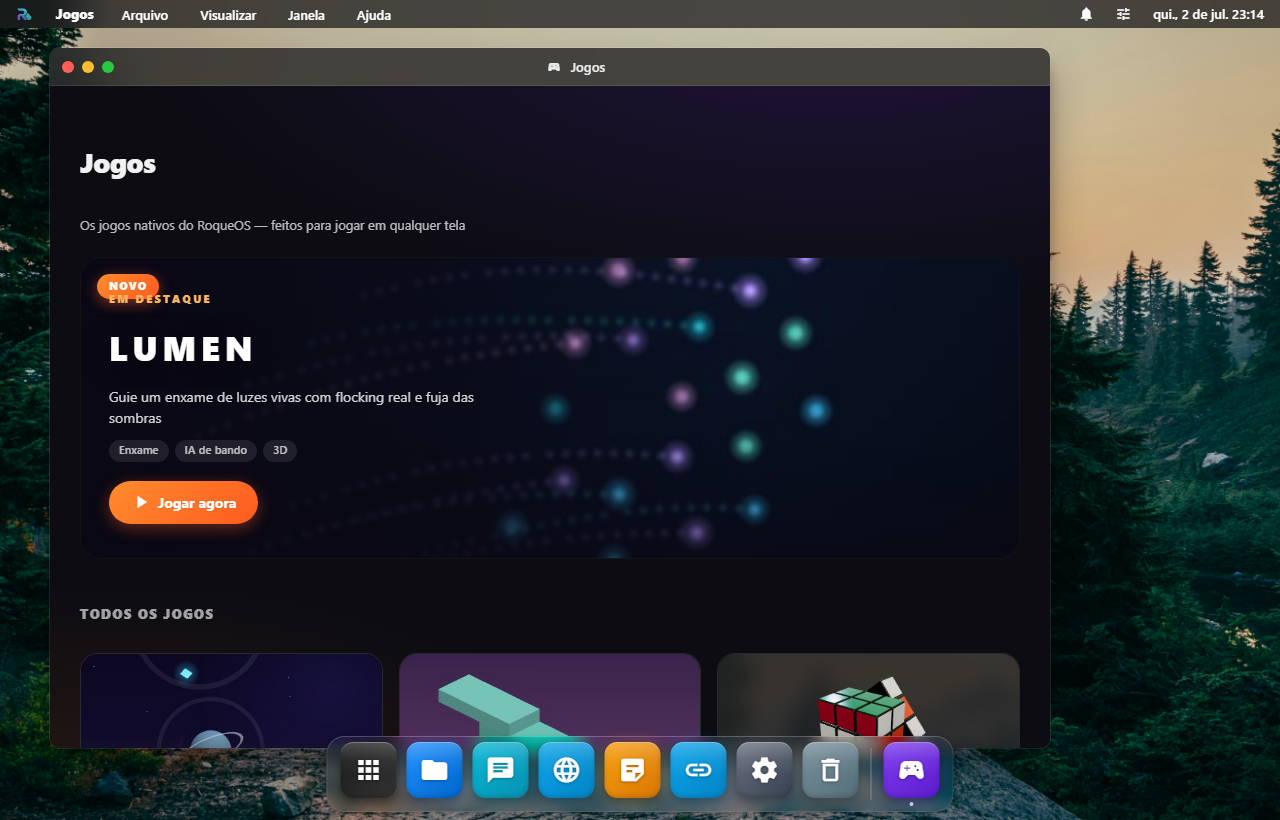
A porta de entrada dos jogos do RoqueOS: uma vitrine moderna com o jogo em destaque, capas, tags e o seu recorde pessoal em cada card. Tudo listado ali é jogo nativo - escrito sob medida pro RoqueOS, sem iframe de site externo, sem download.
O que tem
- Destaque - o lançamento mais recente em um cartão hero com "Jogar agora"
- Biblioteca - todos os jogos nativos com capa, descrição, tags e recorde
- Um clique pra jogar - cada card abre o jogo na própria janela
Por que jogar aqui
- ✅ Roda em qualquer dispositivo - Smart TV de 65", iPhone, notebook do trabalho. Mesma conta, mesmos jogos.
- ✅ Sem download, sem ads, sem coleta de dados
- ✅ Recordes sincronizados na sua conta (jogos com pontuação)
- ✅ Janela do RoqueOS, então você joga enquanto o build/deploy roda em outra janela
Como usar
- Launchpad → Jogos
- Toque no destaque ou em qualquer card da biblioteca
- O jogo abre na própria janela - a galeria continua aberta atrás
⚔️ RagnaRoque - action-RPG 3D num mundo pra explorar
O RPG de ação em destaque da galeria: um action-RPG isométrico em 3D de verdade (Three.js) onde você começa numa Vila Rúnica (praça com fonte, estrada de pedra, casas, igreja, torre, mercado e moinho) e viaja por zonas de bioma através de portais rúnicos: o Bosque Verdejante (níveis 1-7), o Pântano Brumoso (6-13) e o Cume Gélido nevado (13-20). Escolhe entre quatro classes (Guardião, Arcano, Ladino, Bárbaro), anda livre com a câmera seguindo o seu herói, enfrenta feras que vivem em bandos pelas terras selvagens, evolui de nível e coleta loot que se equipa sozinho.
Por que é especial
- ✅ Co-op online com amigos - crie uma sala (código + QR) ou entre com um código e explore/lute numa zona junto com outros jogadores em tempo real: você vê os heróis dos amigos (o modelo da classe de cada um + nome) e vocês enfrentam os mesmos inimigos juntos, cada um com a sua própria progressão.
- ✅ Quatro classes, quatro estilos - Guardião (tanque, gera Fúria apanhando), Arcano (mago à distância movido a Mana), Ladino (furtivo e ágil com Energia) e Bárbaro (berserker que acumula Frenesi batendo). Cada uma tem o próprio modelo 3D, a própria barra de recurso e as próprias habilidades, mais uma árvore de talentos (1 ponto por nível) pra reforçar atributos e aprimorar skills.
- ✅ Um mundo, não uma arena - cidade-hub segura + três zonas de bioma distintas (campina, pântano escuro, picos nevados), cada uma com clima e luz próprios, ligadas por portais rúnicos coloridos: a praça tem um portal pra cada mundo (e pro Coliseu), e cada zona tem um portal de volta pra vila.
- ✅ Feras vivas no mundo - os inimigos vivem em bandos: seguram a posição até você chegar perto, voltam pra casa quando você se afasta, e a zona repopula com o tempo.
- ✅ Missões com NPC - uma aldeã na vila te dá uma missão (derrote feras nas terras e volte pra receber XP e ouro), com diálogo dentro do jogo e um rastreador de missão.
- ✅ Combate + evolução - clique pra andar e atacar, três habilidades por classe na barra, níveis, talentos, atributos e loot (arma/armadura/amuleto) que se equipa sozinho quando é melhor.
- ✅ Coliseu de ondas - o modo sobrevivência clássico continua ali: entre pelo portal rúnico na vila e encare ondas sem fim (a cada 5ª vem um chefe), mantendo o seu nível, equipamento e ouro.
- ✅ Roda em qualquer dispositivo - do iPhone à Smart TV, com modo economia automático em aparelhos fracos.
Como jogar
- Launchpad → Jogos → RagnaRoque
- Escolha sua classe (Guardião, Arcano, Ladino ou Bárbaro) e você aparece na Vila Rúnica; abra a ficha de personagem pra gastar pontos de talento a cada nível
- Ande clicando/tocando no chão, com WASD / setas, ou com o joystick na tela no celular; clique num inimigo pra atacar e use 1 / 2 / 3 pras habilidades
- Gire a câmera (Q / E ou os botões) e alterne entre a visão isométrica e a de cima (terceira pessoa)
- Fale com a aldeã pra pegar a missão, chegue perto de um portal rúnico da praça (ele mostra o nome e a faixa de nível do destino) e confirme pra viajar ao mundo (ou ao Coliseu); cada zona tem um portal de volta pra vila
🔫 Call of Roque - FPS tático multiplayer
O FPS da casa, jogado em equipes, contra outras pessoas ou contra bots. Ele não roda numa janela do RoqueOS: mora no próprio servidor, em callofroque.roqueos.com, e abre em aba nova quando você o escolhe na galeria de Jogos, no Launchpad ou na busca.
O que tem
- ✅ Partida em equipe com outras pessoas, direto no navegador (WebGPU, ou WebGL2 onde não houver WebGPU).
- ✅ Treino contra bots em três níveis (Recruta, Veterano e Elite). O resultado do treino não entra no perfil.
- ✅ Sala por convite: dentro da partida, Esc → Compartilhar sala gera o link e o código.
- ✅ Em desenvolvimento: o mapa e o arsenal ainda mudam.
Como jogar
- Galeria de Jogos → Call of Roque. O jogo abre em aba nova.
- Para jogar com outras pessoas, entre com a sua conta. Para jogar sozinho, escolha Treino e o nível dos bots.
- WASD anda, Shift corre, Espaço pula, clique esquerdo atira e o direito mira. R recarrega, G lança granada e Tab mostra o placar.
🏙️ Agentolandia - cidade aberta online
Mundo aberto no navegador: uma cidade online com carros, armas e 44 moradores que pensam, lembram de você e conversam com IA. Como o Call of Roque, ele não roda numa janela do RoqueOS: mora no próprio servidor, em agentolandia.roqueos.com, e abre em aba nova quando você o escolhe na galeria de Jogos, no Launchpad ou na busca.
O que tem
- ✅ Cidade online: quem entra divide a mesma cidade, a hora e o clima, com chat e lista de quem está lá.
- ✅ Moradores com cabeça: nome, profissão, rotina, família e amigos; lembram do que você fez e respondem com IA.
- ✅ A pé, de carro, armado ou de mãos vazias, em terceira ou primeira pessoa (B).
- ✅ Em português, inglês e espanhol.
- ✅ Em desenvolvimento: a cidade ainda cresce a cada semana.
Como jogar
- Galeria de Jogos → Agentolandia. O jogo abre em aba nova.
- WASD anda, Shift corre, Espaço pula e o mouse gira a câmera. Clique soca e o botão direito chuta; 2 saca a pistola, 4 a arma longa e 3 a granada.
- F entra no carro, T conversa com o morador à frente, I abre o observatório e Esc pausa.
🚦 Roque Frito 1-2-3 - luz verde, luz vermelha em 3D
A nossa versão da brincadeira de domínio público Batatinha frita 1, 2, 3: você corre por um campo gramado enquanto a Vigia (um robô gigante) está de costas (luz VERDE), e congela no instante em que ela vira pra te encarar (luz VERMELHA). Mexeu na vermelha, é pego. Chegue na linha de chegada antes do tempo acabar. Tudo em 3D de verdade (Three.js), dentro de uma arena murada com campo de grama, a Vigia e o corredor.
Por que é especial
- ✅ Campo de grama de verdade - chão texturizado + um campo de lâminas de grama ao vento no desktop, numa arena murada sob um céu azul.
- ✅ Tensão de pára-e-anda - a Vigia leva um instante virando (a sua janela pra frear) e os intervalos de luz variam (1 a 5s), então nunca dá pra decorar.
- ✅ Personagens 3D - o robô Vigia vermelho (te encara = perigo) e o corredor verde animado.
- ✅ Recorde no Pódio - a sua melhor pontuação (progresso + bônus de tempo ao vencer) sincroniza na sua conta.
Como jogar
- Galeria de Jogos → Roque Frito 1-2-3.
- Segure espaço (ou o botão do mouse) pra andar; no celular, o botão Andar. Solte pra parar.
- Ande na luz verde, congele na vermelha, e cruze a linha antes do tempo zerar.
🏁 Roque Gear 3000 - corrida arcade 3D pela Bahia
O racer em destaque da galeria (codinome Farol): uma corrida arcade estilo OutRun/Enduro atravessando os cenários da Bahia - do litoral ensolarado ao Recôncavo, Chapada, sertão e Pelourinho, com o dia rolando de sol a entardecer, noite, neblina e chuva enquanto você dirige. Ultrapasse o trio elétrico, a Kombi de turistas, o ônibus intermunicipal, o caminhão de coco e o carrinho de acarajé antes do tempo acabar - com placas e piadas baianas no caminho.
Por que é especial
- ✅ 3D de verdade - carros de modelo real (um esportivo pra você, sedãs/SUV/etc. no tráfego), sombras suaves, reflexo na pintura e brilho (bloom) no desktop; a beira da pista flui contínua e balizadores passam voando, dando a sensação de velocidade de um arcade clássico
- ✅ Cenário baiano vivo - cada "trecho" muda o bioma e o clima: o mar da Bahia com ondas na beira do litoral, coqueiros, casas de qualidade em cada região (praia, adobe no sertão, casario colorido no Pelourinho), montanhas texturizadas no horizonte e um céu com nuvens, sol e lua
- ✅ Sem game over injusto - bateu? Só um spin-out (perde velocidade e um tico de tempo); o jogo acaba mesmo é quando o relógio zera, e cada ultrapassagem limpa te devolve um pouco de tempo
- ✅ Humor baiano - placas ("Reduza. Capivaras? Não, é só um jegue.") e comemorações ("Ultrapassou o trio elétrico!") a cada façanha
- ✅ Recorde sincronizado na sua conta e no Pódio entre todos os jogadores
Como jogar
- Launchpad → Jogos → Roque Gear 3000 (o destaque)
- O carro acelera sozinho - você desvia com ← → (ou A / D) e freia com ↓ / Espaço; no celular, os botões ◀ ▶ + 🛑
- Ultrapasse o máximo de veículos antes do tempo zerar; cada região nova te dá um bônus de tempo
- Bateu? Você roda e perde velocidade - recupere e siga
🎱 Sinuca - 8-ball num bar 3D, contra a IA ou local
O destaque da galeria: uma mesa de sinuca estilo Brunswick Gold Crown (madeira nobre, miras peroladas, cantoneiras cromadas, caçapas de couro) dentro de um bar com piso quadriculado e luminárias - tudo em 3D de verdade, com física real: tacada com força e efeito (topspin/backspin/english), colisões, tabelas e caçapas.
Por que é especial
- ✅ Física de verdade - a bola desliza e rola, o efeito puxa a branca de volta (ou a faz seguir), o english muda o rebote na tabela
- ✅ Mira profissional - linha de previsão + bola fantasma no ponto de contato + seta da direção da bola alvo, como nos jogos de bilhar famosos
- ✅ IA que joga de verdade - como a física é determinística, o robô simula as tacadas reais antes de escolher: Fácil erra de propósito, Difícil embolsa e ainda deixa a branca posicionada
- ✅ Regras 8-ball honestas - mesa aberta, lisas × listradas, faltas (branca encaçapada, bola errada, sem contato) com bola na mão, e a 8 decide o jogo
- ✅ Efeito no taco - toque na bolinha branca do painel e arraste o ponto para dar efeito
Como jogar
- Launchpad → Jogos → Sinuca (o destaque)
- Escolha Contra a IA (Fácil/Médio/Difícil) ou Local (2 no mesmo aparelho)
- Arraste na mesa para mirar, ajuste a força no slider e toque em Tacar
- Cometeu falta? O adversário ganha bola na mão (toca na mesa para posicionar)
- Embolse o seu grupo inteiro e depois a 8 para vencer
♟️ Xadrez & ♚ Damas - 3D, contra a IA (com níveis), online ou local
Os dois clássicos de tabuleiro em 3D de verdade, com três modos de jogo:
- Contra a IA (com níveis) - escolha o lado e a dificuldade: Fácil (boa pra começar), Médio (um bom desafio) ou Difícil (implacável). A IA "pensa" sozinha (com um indicador IA · pensando…) e abre a partida se você escolher o segundo lado.
- Local - dois jogadores no mesmo aparelho (pass-and-play).
- Online - crie a partida e convide por QR code / código; o amigo entra e vocês jogam em tempo real.
Xadrez tem regras completas - roque, en passant, promoção, xeque, xeque-mate e afogamento; as cartas dos jogadores mostram peças capturadas e vantagem material. Damas (brasileiras) tem captura obrigatória e máxima, dama voadora e promoção, com aviso de "captura obrigatória" quando ela existe.
A IA é um motor próprio (minimax com poda alfa-beta) que roda 100% no seu dispositivo - sem servidor, sem custo, funciona offline.
Como jogar
- Launchpad → Jogos → Xadrez ou Damas
- Escolha Contra a IA (lado + nível), Local ou Online
- Toque numa peça e depois no destino; no online, compartilhe o QR/código com o amigo
🎯 Mais clássicos nativos
- ⭕ Velha 3D - jogo da velha num cubo 4×4×4 (76 linhas de vitória possíveis), com IA em 3 níveis ou 2 jogadores no mesmo aparelho.
- 🧠 Memória - cartas com flip 3D numa mesa e níveis que crescem (de 4 cartas até 30); os acertos ficam virados e marcados com um ✓, e o recorde é salvo por dificuldade.
- 🧱 PRISMA - blocos de "gel" que caem em 3D no estilo Tetris, com peça reserva (hold), próximas peças e controle por gestos no celular (arrastar, tocar pra girar, flick pra descer).
- 🐍 Cobra - a cobra clássica em 3D premium numa arena escura polida vista de um ângulo fixo (o tabuleiro inteiro sempre visível): cobra esmeralda brilhante, comida que brilha, aceleração e recorde sincronizado.
🎵 KaRoque - quiz musical
Você ouve trechos de música, adivinha qual é. Simples na superfície, viciante na prática. Bom pra desafiar amigos em ligação, treinar reconhecimento auditivo, ou só matar 5 minutos enquanto espera deploy.
Modos
- Por categoria: Rock 70-80, Pop 2000s, MPB clássica, K-pop, Anime OST, Hip-Hop BR, Bossa Nova, Trilhas sonoras
- Por dificuldade: Easy (intros famosas), Medium (refrões), Hard (trechos obscuros)
- Speed round: 30 segundos pra acertar o máximo possível
- Daily challenge: 5 músicas novas por dia, ranking global
Por que viciante
- ✅ Música toca por 3-10 segundos - você decide quando parar
- ✅ Múltipla escolha quando você quer dica (
?) ou texto livre quando quer prova - ✅ Sistema de streak - acertos consecutivos vão multiplicando pontos
- ✅ Compartilhar resultado: gera card com pontuação pra colar em redes sociais
Como jogar
- Launchpad → KaRoque
- Escolha categoria + dificuldade
- Toca o trecho - clique no card que você acha que é, ou digite o nome
- Acertou? Próxima. Errou? Ouve mais 2s antes de chutar de novo
- Ao final, ranking + opção de jogar de novo
🧩 Rubik 3D - cubo mágico interativo + benchmark
Cubo mágico em WebGL com rotação real (física), texturas iluminadas e três modos de jogo. Mas o que diferencia: o modo RoqueMark transforma o cubo num benchmark de GPU do seu dispositivo.
Modos do cubo
| Modo | O que faz |
|---|---|
| Resolver | Cubo embaralhado aleatório. Você resolve. Cronômetro mede o tempo. |
| Aprender | Tutorial passo a passo: notação CFOP, F2L, OLL, PLL com setas animadas |
| Daily scramble | Mesmo embaralhamento pra todo mundo no dia. Compare seu tempo com a comunidade |
| Custom scramble | Cole uma sequência WCA-style e ele monta pra você |
| RoqueMark | Benchmark gráfico (veja abaixo) |
Controles
- Desktop: mouse pra arrastar face inteira, scroll pra rotacionar câmera
- Mobile: swipe pra arrastar face, pinch pra zoom, dois dedos pra rotacionar câmera
- Teclado: notação CFOP padrão (
R,L,U,D,F,B+'pra inverso,2pra dobra)
RoqueMark - benchmark gráfico
Single-click testa seu dispositivo em 3 níveis de qualidade:
- Cubo gira freneticamente por 10 segundos em Low (baixa qualidade)
- 10 segundos em Medium
- 10 segundos em High
- Resultado final: tier de hardware + FPS médio em cada nível
Tiers de hardware
| Tier | Faixa FPS | Hardware típico |
|---|---|---|
| ⚡ Enthusiast | 60+ em High | RTX 4070+, Apple M3 Max, Snapdragon 8 Gen 3 |
| 🔥 High-End | 60+ em Medium, 30-60 em High | RTX 3060, Apple M2, Snapdragon 8 Gen 2 |
| 💪 Performance | 60+ em Low, 30-60 em Medium | GTX 1660, Apple M1, mid-range Android 2023 |
| 🖥️ Standard | 30-60 em Low | Integrated Intel UHD, Apple A14, Android 2022 |
| 📱 Basic | < 30 em Low | Chromebook entry, Android antigo, Smart TV |
O RoqueOS usa essa info pra decidir automaticamente se ativa Low-End Mode (desliga backdrop-filter, blurs e animações pesadas) - então o benchmark serve pra otimizar a sua experiência diária.
Info de hardware detectada
Além do FPS, o RoqueMark detecta via APIs do navegador:
- GPU: modelo via WebGL renderer string (ex:
ANGLE (NVIDIA GeForce RTX 3070)) - CPU: número de cores via
navigator.hardwareConcurrency - RAM: estimativa via
navigator.deviceMemory(Chrome only - em GB) - Pixel ratio: DPI da tela (importante pra hi-DPI displays)
- Color gamut: sRGB, P3, ou Rec2020
Como usar
- Launchpad → Rubik 3D
- Modo "Resolver" ou "RoqueMark"
- Mouse/touch pra rotacionar - o cubo responde com física natural
- Pressione
Spacepra embaralhar de novo
🔗 NEXO - uma linha, todos os números, em ordem
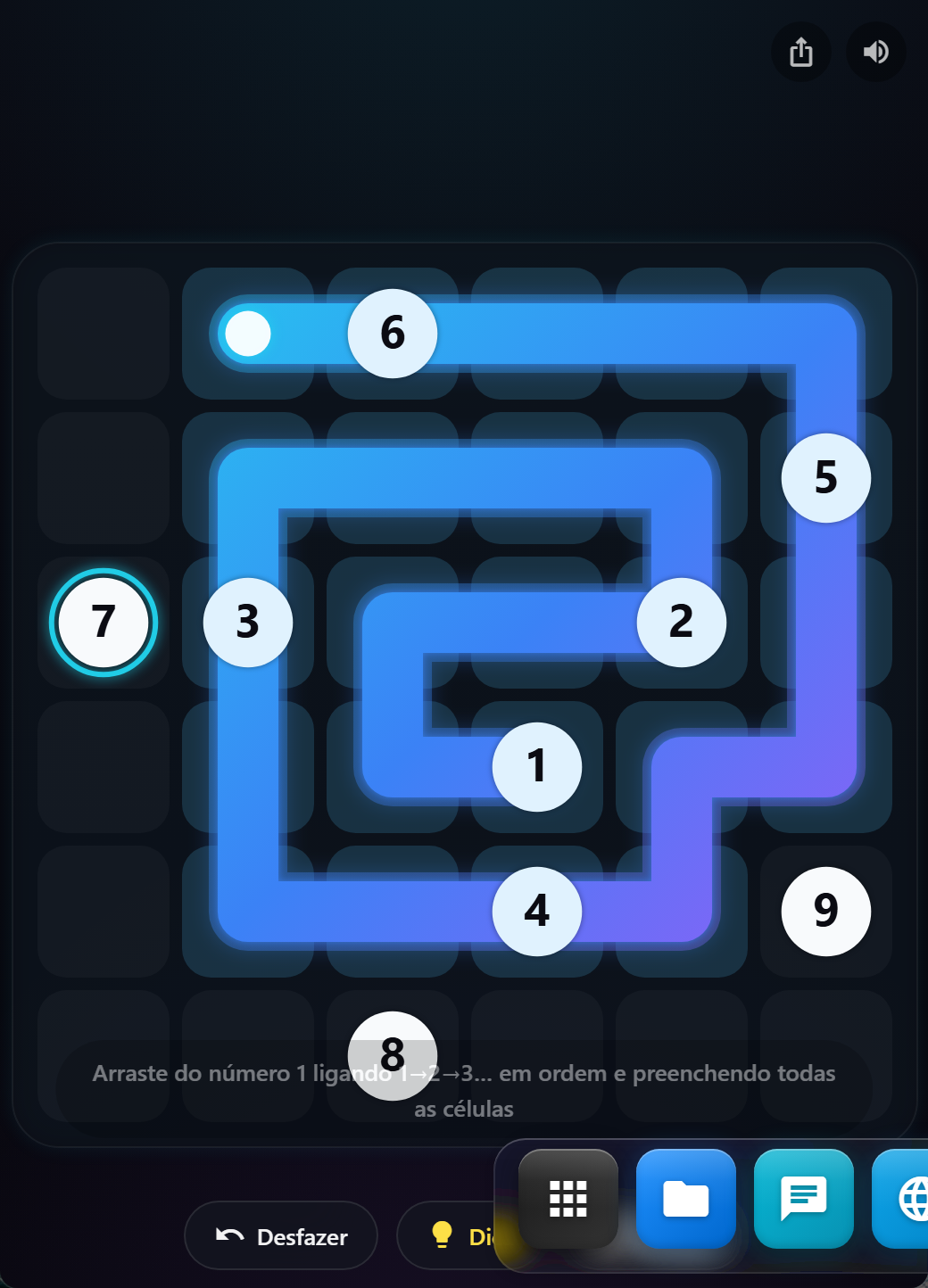
O destaque da galeria: um puzzle de linha única (família do "Zip"). Você traça um só traço contínuo que precisa (1) ligar os números em ordem - 1→2→3…→N - e (2) preencher todas as células do grid. É um caminho hamiltoniano com pontos de controle ordenados, e a graça é resolver a rota inteira sem cruzar nem sobrar célula.
Por que é especial
- ✅ Procedural e sempre solúvel - cada fase é gerada na hora (amostragem de caminho hamiltoniano pelo algoritmo backbite) e vem com uma solução garantida, então nunca cai um tabuleiro impossível
- ✅ Fases que crescem - o grid aumenta e os números ficam mais espaçados a cada fase, aumentando a dificuldade de forma suave e infinita
- ✅ Visual premium - um "ribbon" de luz com gradiente cyan→azul→violeta que flui pelo tabuleiro, células de vidro, chips numerados, o próximo número pulsando e uma celebração a cada fase concluída
- ✅ Ajudas na medida - Desfazer, Dica (revela o próximo passo certo) e Refazer (recomeça a fase), como no original
- ✅ Um traço só - arraste do 1 e vá desenhando; retrace por cima pra desfazer; funciona igual no toque e no mouse
- ✅ Som 100% procedural - cliques que sobem de tom conforme você preenche, um sino em cada número e um arpejo de vitória; recorde (fase mais alta) sincronizado na sua conta
Como jogar
- Launchpad → Jogos → NEXO (o destaque)
- Arraste a partir do número 1
- Ligue 1→2→3… na ordem e preencha todas as células com a mesma linha
- Errou? Retrace por cima, use Desfazer ou peça uma Dica
- Completou → a fase seguinte (maior) começa sozinha; veja até onde você chega
🧱 Breakout - quebre a parede
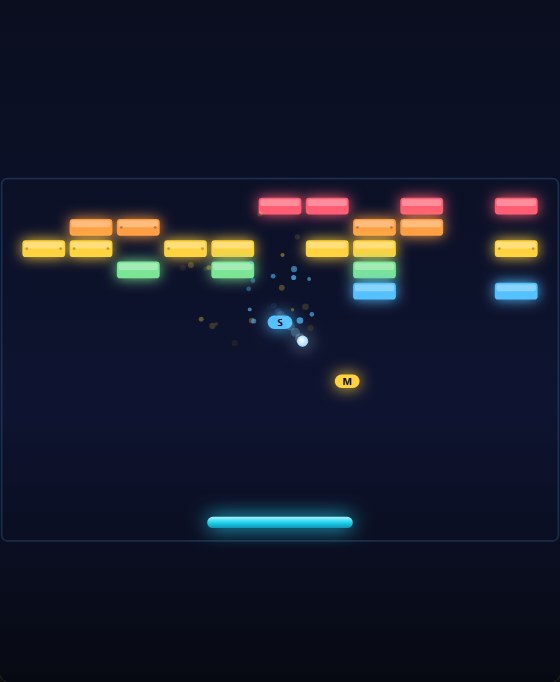
Um quebra-tijolos arcade neon: rebata a bola na raquete pra destruir toda a parede, mantenha o combo aceso e pegue os power-ups que caem. Cada tijolo é um brilho de neon; a bola deixa um rastro luminoso e explode em partículas ao acertar. As fases são geradas na hora e sempre têm solução - ficam mais densas e rápidas a cada nível.
Por que é especial
- ✅ Física de verdade - a bola desliza sem atravessar tijolo (substeps), e o ângulo do rebote depende de ONDE ela bate na raquete: dá controle fino de mira
- ✅ Combos - quebrar tijolos em sequência (sem tocar a raquete) multiplica os pontos
- ✅ Power-ups que caem - raquete larga, multibola e câmera lenta; pegue-os com a raquete
- ✅ Tijolos reforçados que aguentam dois toques nas fases mais altas
- ✅ Fases procedurais sempre solúveis, crescendo em densidade e velocidade
- ✅ Brilho neon, partículas, rastro da bola e screen-shake; som procedural cuja nota sobe com o combo
Como jogar
- Launchpad → Jogos → Breakout
- Arraste (ou setas / A-D) pra mover a raquete; toque / Espaço lança a bola
- Quebre todos os tijolos pra passar de fase; não deixe a bola cair
- Encadeie combos e pegue os power-ups pra pontuar mais
🔢 2048 - junte até chegar lá
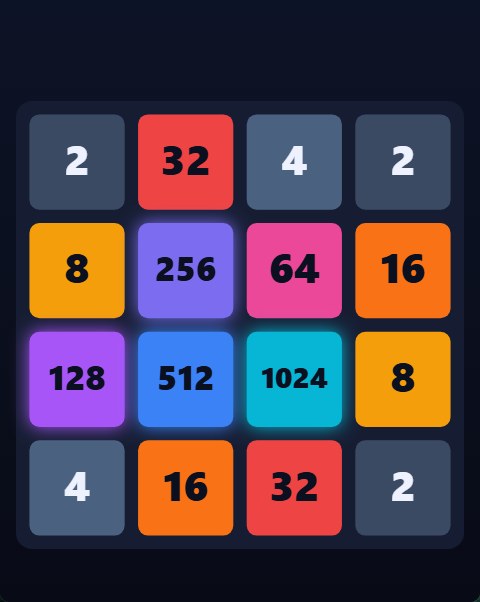
O clássico de deslizar e juntar: empurre todas as peças pra um lado, números iguais se fundem no dobro e uma peça nova aparece a cada jogada. Chegue à peça 2048 pra vencer - e continue jogando pra fazer o maior placar. Simples de aprender, difícil de largar.
Por que é especial
- ✅ Fusões suaves - cada peça desliza e dá um "pop" ao se fundir; animação limpa em qualquer dispositivo
- ✅ Uma fusão por peça por jogada (regra clássica) - planejar a ordem é a habilidade
- ✅ Continue depois do 2048 pra caçar recordes cada vez mais altos
- ✅ Recorde salvo e sincronizado com a sua conta
- ✅ Paleta vibrante por valor e som que sobe conforme a peça cresce
Como jogar
- Launchpad → Jogos → 2048
- Deslize (ou setas / WASD) pra mover todas as peças
- Números iguais se fundem - chegue à peça 2048
- Fim quando não houver mais movimento; continue pra bater o recorde
🪵 TORA - encaixe os blocos de madeira
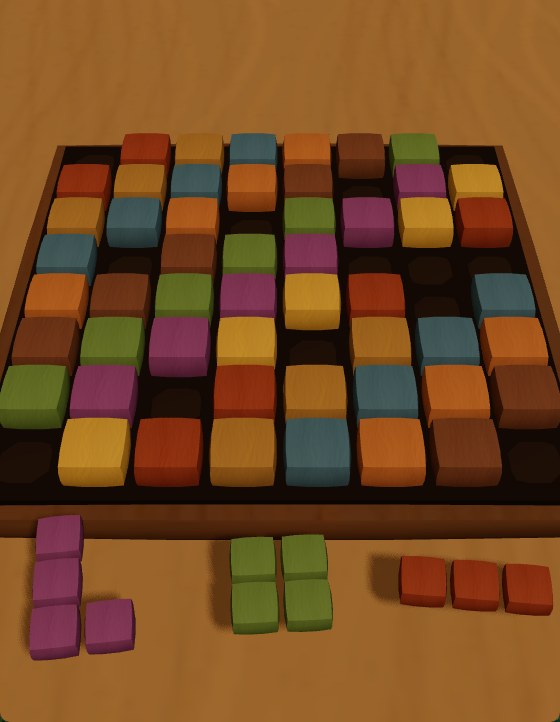
Um quebra-cabeça de blocos de madeira em 3D: um tabuleiro 8×8 e uma bandeja com três peças embaixo. Arraste cada peça para o tabuleiro e, quando você completa uma fileira ou coluna inteira, ela some. Você perde quando nenhuma das três peças cabe em lugar nenhum - e passa de nível ao aguentar uma sequência de jogadas, quando as peças ficam maiores e a meta cresce.
Por que é especial
- ✅ Madeira de verdade em 3D - grão da madeira, relevo na superfície, sombras suaves e um brilho acetinado; cada peça é um tom de madeira diferente, então o tabuleiro vira um mosaico
- ✅ Arraste preciso - pegue a peça, veja um contorno verde/vermelho de onde ela vai encaixar, e solte; funciona no toque e no mouse
- ✅ Linha OU coluna - completar qualquer fileira ou coluna limpa com uma explosão de partículas; encadeie limpezas pra multiplicar os pontos
- ✅ Níveis - sobreviva à meta de jogadas pra subir de nível; as peças ficam mais difíceis e a bandeja nunca te deixa sem uma jogada possível
- ✅ Gire e dê zoom - arraste o fundo (fora das peças) pra girar o tabuleiro na horizontal e vertical; use a pinça de dois dedos ou o scroll pra aproximar
- ✅ Cabe na tela - no celular a câmera se ajusta pra as três peças da bandeja aparecerem sempre
Como jogar
- Launchpad → Jogos → TORA
- Arraste uma peça da bandeja para o tabuleiro
- Complete uma fileira ou coluna inteira pra limpá-la
- Não deixe as três peças ficarem sem encaixe - aguente pra passar de nível
🔊 EKO - no escuro, o som é a sua luz
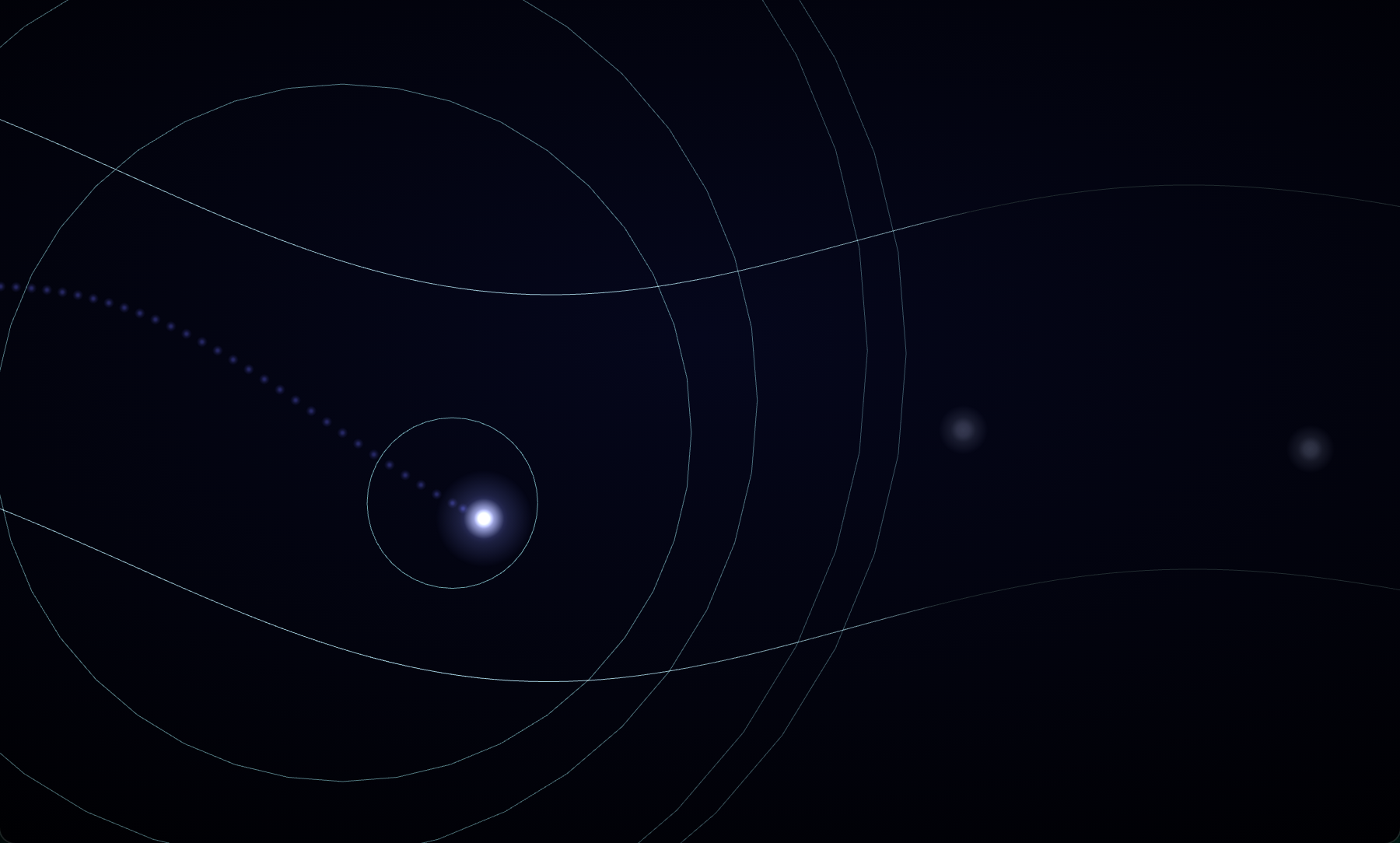
Um planador numa caverna completamente escura: as paredes só existem onde um anel de eco passou. Um pulso automático bate como um coração a cada 2,5 s, e cada cristal coletado emite um novo pulso - a recompensa do jogo é literalmente informação. Segure pra subir, solte pra descer, e vá cada vez mais rápido por um túnel procedural infinito que aperta pra sempre.
Por que é especial
- ✅ Ecolocalização jogável - anéis de eco varrem a caverna e revelam as paredes por um instante, com pós-brilho que decai
- ✅ Recompensa = luz - cristais valem pontos E disparam um pulso extra na posição deles
- ✅ Caverna infinita procedural - determinística por semente, sempre mais estreita, com estalactites a partir de certa profundidade
- ✅ Um toque - segurar/soltar, no celular ou com a barra de espaço
- ✅ Morte cinematográfica - ao bater, a caverna inteira se ilumina por um segundo pra você ver onde estava
- ✅ Som 100% procedural - ping de sonar com eco duplo, batida de coração, vento que cresce com a velocidade
Como jogar
- Launchpad → Jogos → EKO
- Segure pra subir, solte pra descer
- Colete cristais - cada um emite um novo pulso de eco (e vale 10 pontos)
- Sobreviva o máximo: a pontuação é a distância + os cristais
✨ LUMEN - guie o enxame de luzes
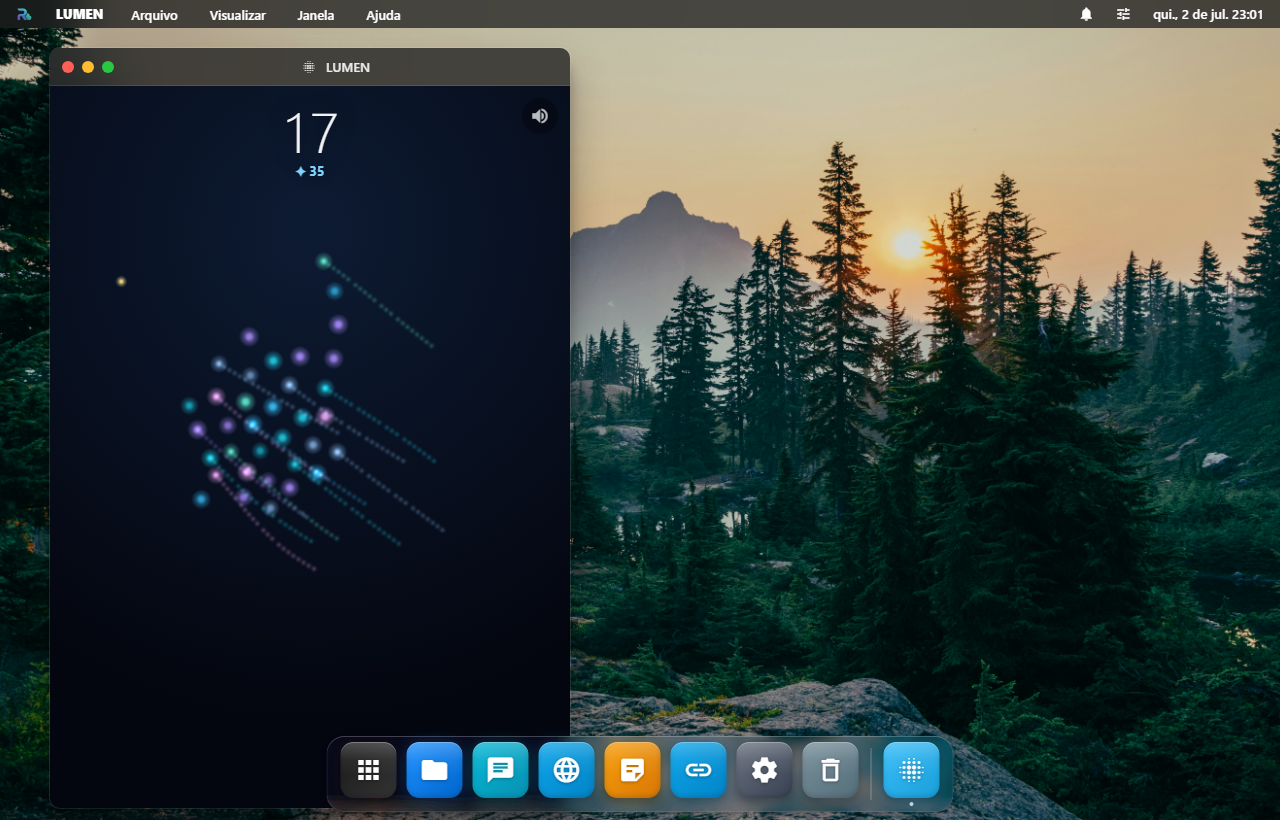
O jogo mais inesperado do RoqueOS: você não controla UMA coisa - você guia com o dedo um enxame vivo de mais de 200 luzes bioluminescentes que se move como uma murmuração de estorninhos. É flocking de verdade (o algoritmo de boids de Craig Reynolds: separação, alinhamento, coesão) acelerado por um grid espacial pra rodar liso mesmo com centenas de agentes.
Por que é especial
- ✅ IA de enxame real - cada luz decide seu movimento a partir das vizinhas; o resultado emergente é uma murmuração hipnótica que serpenteia atrás do seu toque
- ✅ Controle contínuo - arraste o dedo e o enxame flui até lá; solte e ele vagueia sozinho
- ✅ Cresça coletando fagulhas - cada mota de energia adiciona uma luz ao enxame (até 200+)
- ✅ Predadores-sombra que patrulham, telegrafam e dão investidas - dá pra desviar; o enxame se dispersa em pânico e você o reagrupa
- ✅ Estrela rara inverte o jogo por alguns segundos: invulnerável, e os predadores fogem de você
- ✅ Câmera com zoom dinâmico pelo tamanho do enxame, biomas que evoluem, trilhas de cometa e som 100% procedural
Como jogar
- Launchpad → Jogos → LUMEN (o destaque)
- Toque e arraste para guiar o enxame
- Colete as fagulhas douradas para crescer; desvie das sombras
- Pegue a estrela quando aparecer - vira a maré
- Acaba quando a última luz se apaga
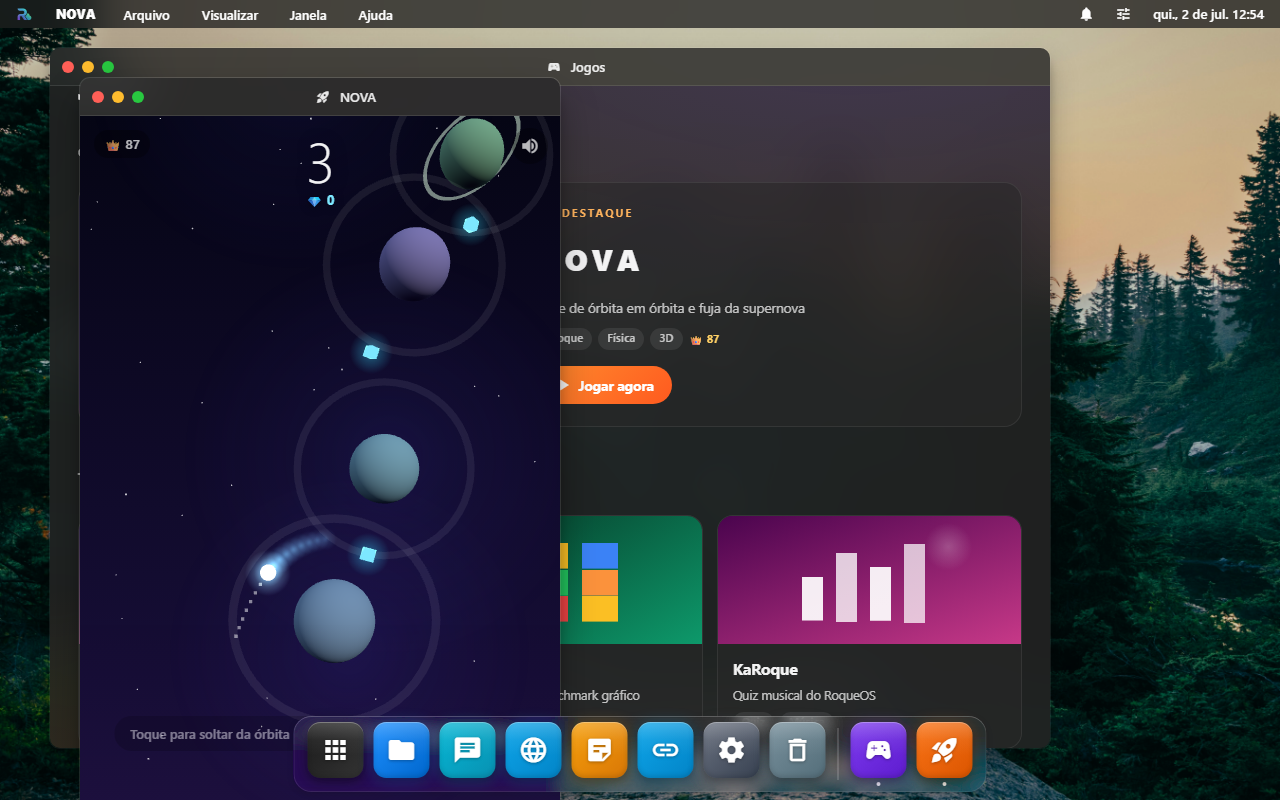
🚀 NOVA - fuja da supernova
O jogo mais ambicioso do RoqueOS: um survival orbital com física de verdade. Sua nave orbita automaticamente o planeta mais próximo; um toque solta na tangente e a gravidade dos corpos ao redor curva seu voo até a próxima captura. Enquanto isso, uma supernova consome o campo estelar atrás de você - suba, desvie dos sóis e colete cristais (cada um empurra a onda pra trás).
Por que é especial
- ✅ Física orbital real - gravidade newtoniana (n-body suavizado) simulada a 120 passos/s
- ✅ Trajetória prevista - uma linha pontilhada calcula em tempo real pra onde você vai se soltar AGORA
- ✅ Um toque, teto de habilidade alto - o timing do release é tudo
- ✅ Campo infinito procedural - cada partida gera um universo novo (e sempre escalável)
- ✅ Supernova viva - parede de plasma com shader animado, que acelera conforme você sobe
- ✅ Som 100% procedural - whoosh no release, acorde na captura, arpejo nos cristais e um rumble que cresce quando a onda se aproxima
Como jogar
- Launchpad → NOVA (ou pelo destaque da galeria Jogos)
- Toque (ou
Espaço) pra soltar da órbita no momento certo - A gravidade faz o resto - seja capturado pelo próximo planeta
- Sóis queimam; cristais valem pontos e atrasam a supernova
- Game over mostra altura, cristais e botão de compartilhar
🏗️ SkyStack - empilhe blocos até o espaço
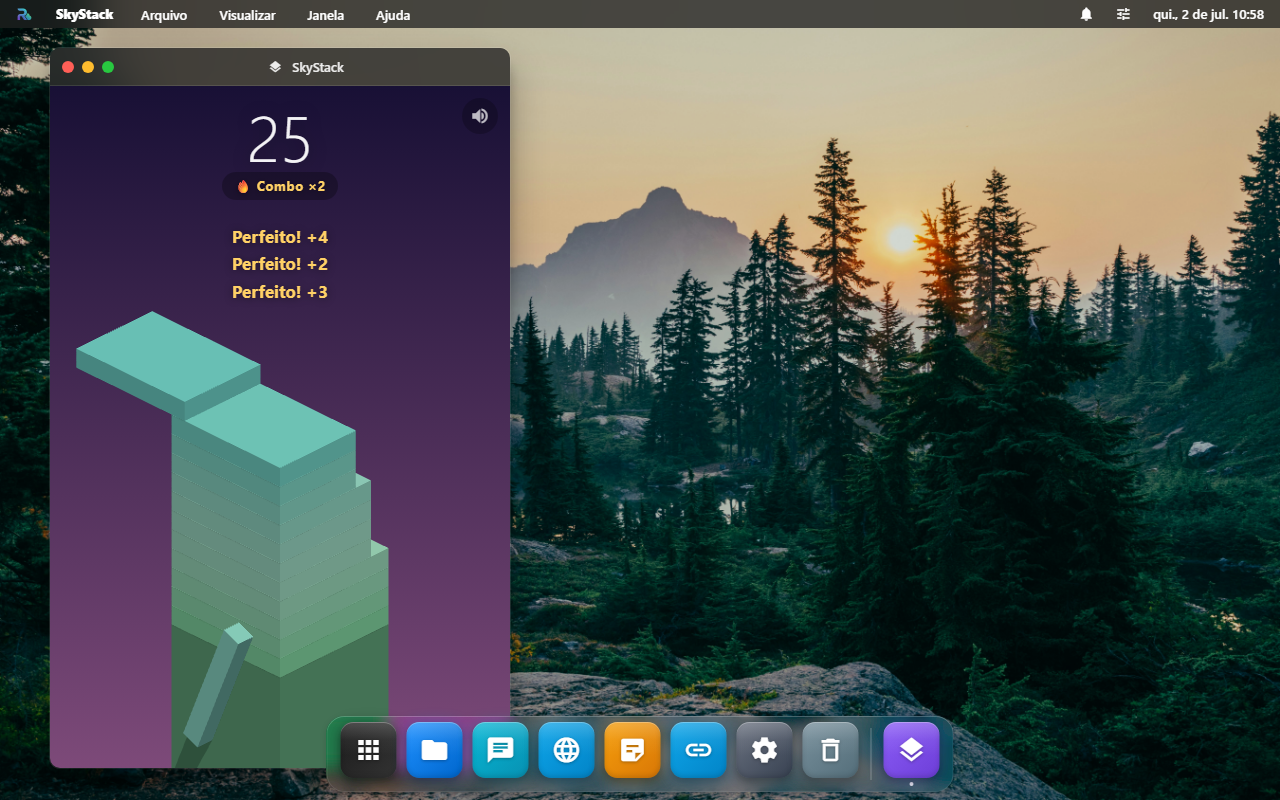
Jogo one-touch em 3D: blocos deslizam sobre a torre e você toca no momento exato pra empilhar. Errou o alinhamento? A sobra é cortada e cai - a torre vai afinando até não sobrar nada. Acertos perfeitos em sequência rendem combo, bônus e recuperam o tamanho do bloco.
Por que vicia
- ✅ Um toque - qualquer pessoa aprende em 3 segundos (touch, mouse ou
Espaço) - ✅ Combo com recompensa - acertos perfeitos tocam notas musicais que sobem de tom e devolvem tamanho ao bloco
- ✅ Biomas que evoluem - o cenário muda conforme você sobe: aurora → céu → pôr do sol → noite → espaço estrelado
- ✅ "Só mais uma" - partidas de 30 segundos, recorde salvo e sincronizado na sua conta
- ✅ Compartilhável - gera uma imagem do seu recorde com a torre de fundo pra desafiar amigos
Detalhes que fazem diferença
- Som procedural - nada de arquivos de áudio: cada "perfeito" toca uma nota da escala pentatônica que sobe com o combo
- Vibração tátil no celular (Android) a cada bloco
- Modo economia - em dispositivos fracos o jogo desliga sombras e partículas sozinho, mantendo 60 fps
- Pausa automática - trocou de janela? O jogo pausa e espera você voltar
Como jogar
- Launchpad → SkyStack
- Toque (ou
Espaço) pra começar - Toque quando o bloco deslizante alinhar com a torre
- Game over mostra altura, recorde e botão de compartilhar
Veja também
- Music (Afinador + Drums + Frequency) - apps musicais "ferramentas avulsas" pra estudar/criar música
- Tablatura - editor multitrack profissional
- Cloud Gaming Android - Android emulado pra rodar PS Remote, Xbox Cloud Gaming, GeForce Now, Steam Link, Moonlight, Parsec direto no RoqueOS (qualquer jogo de qualquer plataforma)